
1- Access your Enigma2 and get your IP address
Go to Settings / Configuration / System Network Device Configuration Adapter Settings
And get your IP address, it starts with 192.168….
2– Go to your Windows PC and download the Putty software
Putty Download URL:https://the.earth.li/~sgtatham/putty/latest/x86/putty.exe
3- Open Putty add follow these steps
Add your IP address of your Enigma (same IP as in step 1) Port 23 Telenet connection type Click on open

4 – Your default login and password are root|

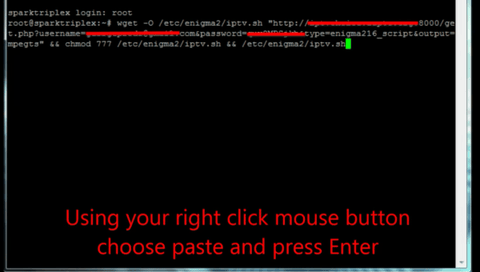
5 – Copy your URL line (you will get it after ordering your subscription)

6 – Use mouse button right click after entering your line, press ENTER
7– Type reboot and your device will reboot

Now you will find IPTV folder, all IPTV channels are in your IPTV folder
Any questions please feel free to contact us, we will reply it as soon as possible!
Email: service@enzolive.tv