
Warning: include(/www/wwwroot/www.bestm3u.com/wp-content/cache/sgo-cache/43.166.248.112-f01273f8b0f27ce4e18c609df12cc24f/api/api-docs/85357): failed to open stream: No such file or directory in /www/wwwroot/www.bestm3u.com/wp-includes/class-wp.php on line 827

Warning: include(): Failed opening '/www/wwwroot/www.bestm3u.com/wp-content/cache/sgo-cache/43.166.248.112-f01273f8b0f27ce4e18c609df12cc24f/api/api-docs/85357' for inclusion (include_path='/www/wwwroot/www.bestm3u.com/wp-content/plugins/kirki/:/www/wwwroot/www.bestm3u.com/wp-content/plugins/kirki/core:.:/www/server/php/74/lib/php') in /www/wwwroot/www.bestm3u.com/wp-includes/class-wp.php on line 827
Operation guide Android TV (Perfect Player) – ENZO’S Stream TV
Your Cart

Operation guide Android TV (Perfect Player)

Go to Google Play Store and download Perfect Player IPTV

Please follow the 14 steps

1 – Open Perfect Player

2 – Go to Settings

3 – Now you are in the Settings page, go to General

4 – Go to Playlist and enter Your URL and add by name ALL IPTV once you are done click OK

5 – Go to EPG

6 – Enter your EPG URL after done click OK
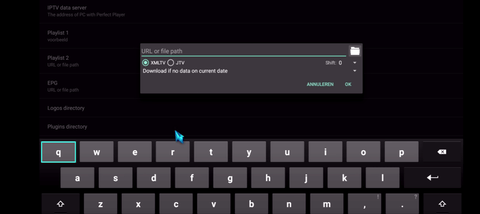
7 – Return to your Page Settings and go to Reading

8 – Check ONLY change system volume

9 – Return to your Settings page and access the GUI

10 – Check ONLY Show Channels as Group Folder

11 – Restart Perfect Player

12 – Now you see the channel list on the left side

13 – Press the left button on the remote, now you have all the channels in the group folder

14 – Go to any folder and enjoy watching all channels

Any questions please feel free to contact us, we will reply it as soon as possible! 

Email: service@enzolive.tv

Free Trial

Free 4 hours trial

Fast Delivery

Deliver to your email in 12 hours

International Warranty

Offered in the country of usage

100% Secure Checkout

PayPal / MasterCard / Visa

© ENZO’S Stream TV 2026